Barcode label generation and printing — 1D, 2D, QR and RFID
WYSIWYG application for creating and customizing barcode labels. Total design control, database connectors, compatible with any printer.




Generic label tools (Word, online generators) produce non-compliant GS1/EAN codes, broken label templates and no audit trail. Rejected shipments and relabeling at the customer dock cost €500–€2,000 per incident.
Logistics and QA Managers at suppliers shipping to retail chains, automotive and pharma with strict GS1/EAN / UDI labeling mandates.
From kickoff to go-live 14 days
A methodology matured through years of real-world deployments. We know every step, every pitfall, every accelerator.
Complete barcode & RFID encoding — generate, design, print, encode.
Rosistem offers end-to-end barcode and RFID solutions spanning labels, printers, scanners, RFID tags and software for products, pallets, assets and documents. The Barcode Label Designer provides a WYSIWYG graphic editor with preview and advanced editing, while the Barcode Generator produces unique codes in the major 1D and 2D symbologies. The platform includes an integrated article nomenclature, bulk printing, EPC/RFID management and connectors for WMS, ERP and POS — serving aerospace, pharma, textiles, electronics, logistics, automotive, food and retail.
Barcode Label Designer
The Barcode Label Designer is a WYSIWYG graphic application for designing and printing labels, with a live preview and advanced editing tools: shapes, images, variable text fields, formulas and list generation with unique codes. A built-in article nomenclature with configurable columns drives variable-data printing, so a single label template can be reused across thousands of SKUs. The designer supports thermal, laser and inkjet printers, as well as card and wristband formats.

Barcode Generator — all major symbologies
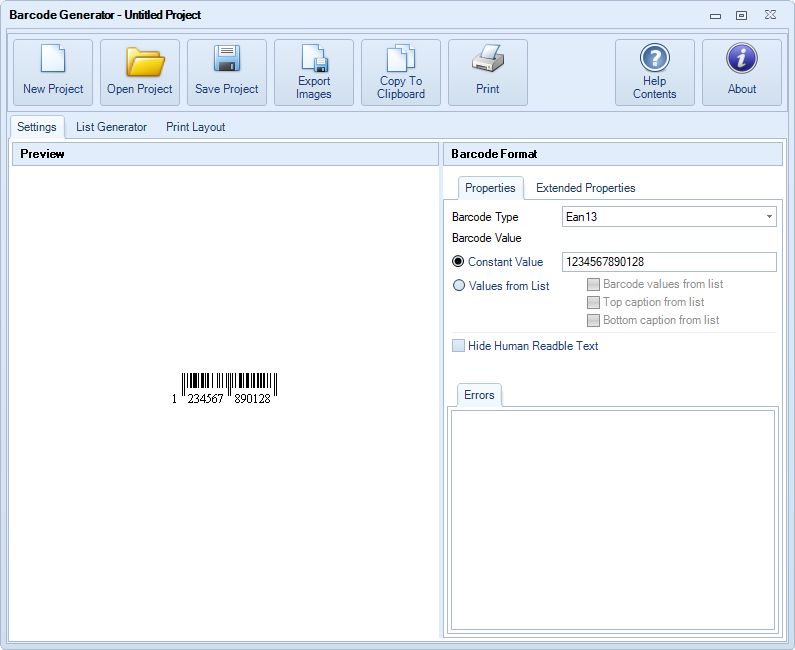
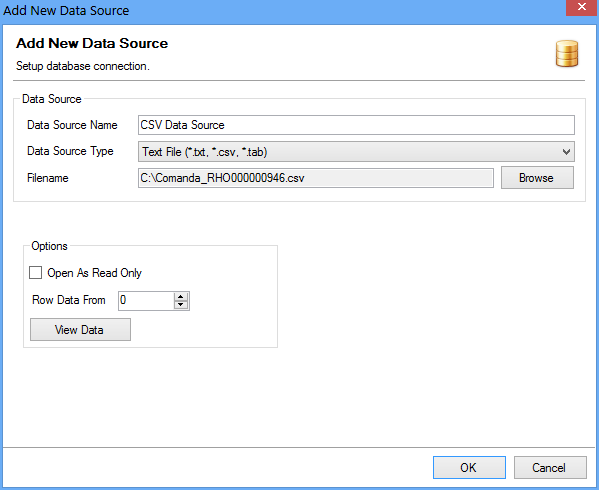
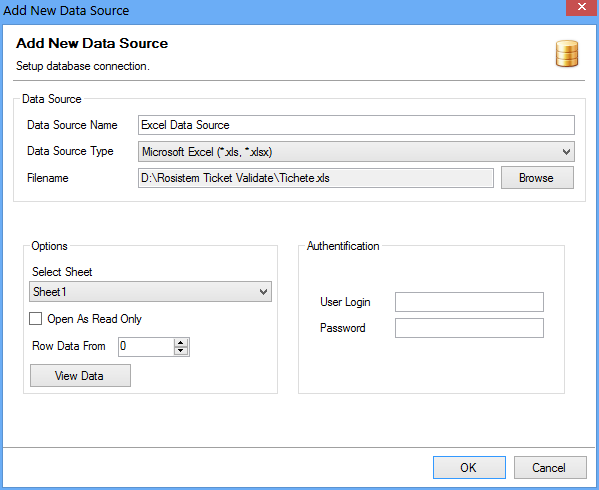
The generator produces barcodes in EAN, UPC, Code 128, Code 39, ITF, GS1-128, QR Code, DataMatrix, GTIN, SSCC and GS1 DataMatrix. It can generate single codes or large batches from Excel/CSV sources, with GS1-compliant structures and validation, bulk printing on rolls, sheets and card labels. For postal applications, USPS, British Royal Mail and Australian Post formats are supported. Output can be vector (EPS, PDF) or raster at any resolution, ready for pre-press or direct printing.

RFID encoding & smart labels
RFID smart labels combine a printed barcode with an encoded RFID tag, so the same label can be read optically at retail and through packaging at the pallet gate. Rosistem software encodes EPC data synchronized with the printed barcode, and EPC/RFID management tracks pallets, cases and items through the supply chain. This is the foundation for zero-touch receiving, fast inventory and loss prevention in retail and logistics.

WMS, ERP & POS integration
The entire suite is designed to plug into existing WMS, ERP and POS systems. Labels and codes can be generated on demand as part of receiving, production or dispatch workflows, with automated re-print on rejects. Developer components (covered separately) let in-house teams embed barcode generation inside their own applications. Technical requirements are lightweight — Windows XP or newer, .NET Framework 3.5 SP1 — which makes it easy to deploy on existing workstation fleets.
Everything you need, in one system
All 1D & 2D symbologies
EAN, UPC, Code 128, Code 39, ITF, GS1-128, QR, DataMatrix, PDF417.
Postal formats
USPS, British Royal Mail and Australian Post out of the box.
WYSIWYG label designer
Visual editor with preview, shapes, images and variable fields.
Article nomenclature
Integrated product list with configurable columns feeding variable data.
Bulk printing & list generation
Generate thousands of unique codes in one run, on rolls or sheets.
EPC / RFID management
Encode smart labels synchronized with the printed barcode.
Thermal, laser & inkjet output
Works with any Windows-installed printer — thermal, card, wristband, matrix.
GS1 validation
Automatic check-digit and structure validation for standards compliance.
See the solution at work




Real-world scenarios by industry
Connects with the systems you already run
Runs on any industrial terminal
Key objectives
Five objectives. Professional barcode label design.
Professional design
Create professional-looking labels without design knowledge. WYSIWYG visual editor with drag & drop.
Total flexibility
Any size, any format, any content. Fixed fields, variables from databases or calculated formulas.
Data connectors
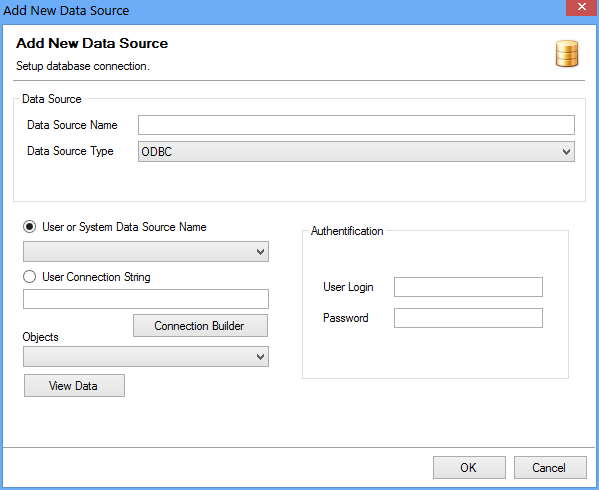
Connect label to Excel, SQL Server, Access or any ODBC database. Data updated automatically.
Automation
Automatic batch printing: print hundreds of labels with different data in a single click. Event-based triggers.
Universal compatibility
Compatible with any Windows printer: Zebra ZPL, laser, inkjet, thermal. No additional special drivers.
Demo video
See the app in action
Demo video
See the app in action
Watch a complete application demo and discover how it can transform your company processes.
Request a personal demoRosistem Barcode Generator
Generate barcodes in any symbology
Rosistem Barcode Generator produces unique 1D and 2D codes — EAN, UPC, Code128, GS1-128, QR, Data Matrix, PDF417, Aztec — for products, pallets, assets and documents. Single or bulk generation from a data source (CSV, Excel, ODBC), automatic check-digit validation, export as image or direct to printer. Complementary to Label Designer, but works standalone.
Features
Modules for barcode label design and printing
From receiving to shipping — every stage controlled, every operation traceable.
WYSIWYG label editor
Drag & drop, resize, align, group. Live preview. Multi-page support and complex labels.
Barcode 1D (Code128, EAN, etc.)
All 1D barcode types: Code128, EAN-13, EAN-8, UPC-A, UPC-E, Code39, ITF, Codabar and more.
Barcode 2D (QR, DataMatrix, PDF417)
Full 2D codes: QR Code, DataMatrix, PDF417, Aztec, MaxiCode. Automatic encoding and optimal sizing.
RFID encoding
Write data on UHF or HF RFID tags simultaneously with label printing. Automatic validation after writing.
Database import (Excel/SQL/ODBC)
Connect to any data source: Excel, SQL Server, Access, MySQL, ODBC. Visual field mapping.
Batch printing
Print hundreds or thousands of labels in series, with different data from the database. Visible progress and error report.
On-demand printing via API
Trigger label printing from any external application via REST API or COM automation. Simple ERP integration.
GS1 & industry compliance
GS1-compliant templates including GS1-128, SSCC for logistics, retail and manufacturing. Amazon, Carrefour, ANRE and other specific requirements supported.
Industry templates
Ready-to-use template library: warehouse, manufacturing, retail, pharma, food, logistics. Customizable with one click.
Why Rosistem
Fast implementation. Guaranteed ROI. Local support.
From Design to Print in a Few Steps
Step 1: Design the label template
The visual drag-and-drop editor allows creating custom labels: logo, text fields, barcodes (Code128, QR, EAN-13, GS1-128, DataMatrix, SSCC-18), images. Templates are saved and reused.
Step 2: Connect to the data source
Dynamic fields are populated from WMS (product name, lot, expiry date, weight, price) or from Excel/CSV import. One label template → hundreds of different labels generated automatically.
Step 3: Print on any thermal printer
Native support for Zebra (ZPL), Sato, Honeywell, TSC, Citizen and any Windows-compatible printer. You can print directly at the scale (integrated with DIGI/SWS scales).
Step 4: Monitoring and reprinting
Print history is recorded in WMS. Reprint any label with one click, with updated data. Label consumption reports per warehouse and operator.
Answers to your questions
What barcode standards are supported?
We support all GS1 standards: EAN-8, EAN-13, UPC-A, UPC-E, Code128, GS1-128, ITF-14, GS1 DataBar, QR Code, Data Matrix, PDF417, Aztec, SSCC-18. We can also generate proprietary codes for internal use.
Does the software work standalone, without any other system?
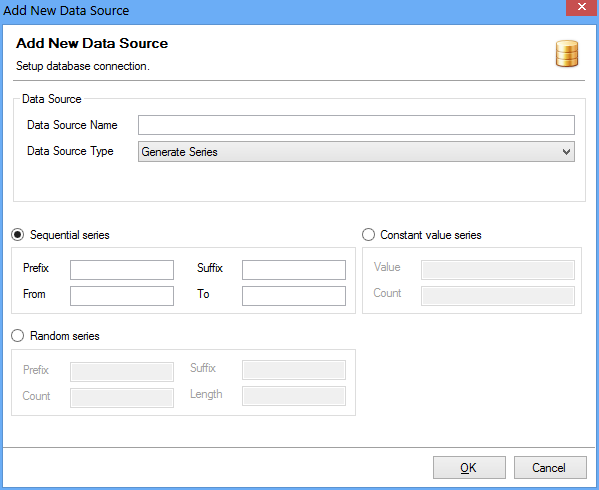
Yes. The barcode software is fully standalone — design labels in the WYSIWYG editor and print directly. Data can be typed manually, imported from CSV/Excel, pulled from ODBC databases, or generated automatically from a series. No external system required.
What data sources can be used at print time?
The Barcode Label Designer connects to CSV, Excel (XLS/XLSX), ODBC databases (SQL Server, MySQL, Oracle, PostgreSQL, Access) and built-in number/date series. The same label template can be reused across multiple data sources, with variable fields populated at print time.
Does it work with DIGI scales?
Yes. We have direct integration with DIGI SP, DIGI SM and SWS series scales. The measured weight is captured and inserted into the label automatically at printing.
How do I update prices on labels?
Prices come from your data source — Excel sheet, database query or external feed — and are read fresh on every print. No stale stock of pre-printed labels: change the price at the source and re-print on demand.
Ready to implement Rosistem Barcode Software?
Request a free, personalized demo for your company. Our consultant will contact you within 24 hours.
Other Rosistem solutions